Maximize Your Real Estate Marketing Kit: A Step‑by‑Step Guide for Agents
Updated: Apr 26

At Castle Snap Media, we built our marketing kit as a powerful, real‑world solution for your marketing needs. It’s designed to complement your photo and media packages by helping you attract buyers, impress sellers and showcase your personal brand. We include the kit as a free add‑on with your first photo shoot, and because it’s white‑labelled you can present your listings under your own brand without any references to our platform. The marketing kit needs to be purchased with each photo shoot in order to access all of the marketing tools for that property. It provides one year of access; if the property is still on the market after a year, you can renew the kit for an additional $25 per year.
Access & pricing: Most of our photo packages include the marketing kit automatically. You can add the kit to any photoshoot for $25, which covers one year of hosting and updates (additional years can be renewed as needed).
What’s Included in the Kit
Our marketing kit automatically generates media for every listing we photograph for you. Here’s an overview of each tool and why it matters:
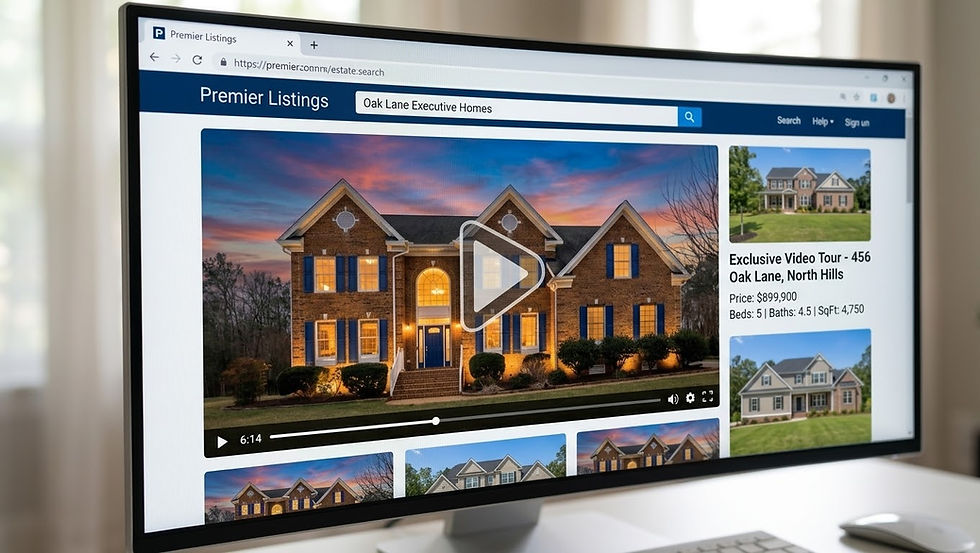
Single‑property websites: Pre‑designed and customizable templates let you add unlimited photos and videos. Features include virtual‑tour support, an embeddable floor plan, a photo & video gallery, background music, a lead‑capture form, Google Map integration and co‑listing support. These websites are modern, MLS‑compliant and automatically created for each listing.
Automated flyers: Dozens of flyer templates in various styles are pre‑filled with your photos and listing details. A drag‑and‑drop builder makes customization easy. You can create your own templates and download flyers as PDFs for print or digital sharing.
Social‑media graphics: The kit generates optimized graphics for major social platforms. Templates cover every stage of the listing—from “Just Listed” to “Sold”—and you can create custom tiles of any size. Photos and listing details populate the designs automatically, and colors, fonts and text are easily edited.
Social‑media videos: Full‑motion videos and vertical reels are formatted for popular platforms and automatically assembled from your photos and videos. You can tweak text overlays, clip order and music, and choose between branded or unbranded versions.
Video reels & full‑length slideshows: Beyond short social clips, full‑length slideshows showcase all your listing photos with elegant transitions. The kit can auto‑publish these to your preferred video‑hosting platform to increase visibility and boost search‑engine optimization.
Lead‑generator phone number & sign rider: Each property website includes a phone number and unique property code. Buyers can text the code to get the website link, while you receive their number as a lead—a powerful addition to traditional marketing.
Analytics & weekly traffic reports: Integrated analytics reveal how visitors interact with your property websites. You can also send optional weekly traffic reports to your sellers to keep them informed of marketing progress.
Additional tools: The kit offers client‑listing pages for displaying multiple active listings, business‑card or “about me” videos, embedded 3‑D tours, background‑music selections and co‑lister support
Why This Kit Matters
Having access to these tools gives you a significant competitive edge. Dedicated property websites deliver unparalleled visibility and allow buyers to focus solely on your listing. Personalised branding on the websites and marketing materials helps you stand out, while social‑media templates and videos make it easy to dominate social channels. The lead‑generation phone number and analytics provide measurable results and help capture new clients. All of this comes at a fraction of the time and cost required by traditional marketing methods.
Step‑by‑Step: Making the Most of Your Marketing Kit
Follow these steps to unlock the full potential of your marketing kit and maximize your listing’s exposure.
Access your kit. After your photography appointment, you’ll receive an email with a link to your media delivery. Log into the portal and open the marketing kit for your property. The kit is automatically populated with your photos and basic listing details.
Customize your property website.
Choose a design: Select from ten pre‑designed website styles or ask for a custom design.
Edit content: Add a compelling property description, features list, and agent bio. Upload additional photos or videos and drag them into the desired order.
Add floor plans and 3D tours: Use the floor‑plan file delivered with your photos or embed a 3D virtual tour.
Enable lead capture: Ensure the lead‑capture form is active, so buyers can inquire directly.
Set background music: Choose from various tracks to create an immersive experience.
Publish: Use the unbranded link for the MLS and the branded link for social media and email signatures.
Generate and share social‑media graphics.
Open the social‑media section and choose a template appropriate for your listing status (e.g., Just Listed, Price Reduced, Under Contract, Open House, Sold).
Customize colors and text to match your personal branding. Because templates auto‑populate with photos and property details, changes are usually minimal.
Download the images to your computer or mobile device. Post them across your preferred social networks and professional channels. Use relevant hashtags to increase reach.
Create engaging videos and reels.
Choose from vertical reels or full‑length slideshows. Reels are ideal for vertical story‑style social feeds; full‑length videos work well on video‑sharing platforms and your property website.
Edit text overlays to highlight key features or price improvements. Select a soundtrack and adjust the clip order if desired.
Publish directly from the kit or download and upload to your channels. For added exposure, enable the auto‑publish option to your preferred video‑hosting platform.
Design professional flyers.
Navigate to the flyer creator and select a template. Drag and drop your best photos into the design and adjust headings and descriptions.
Add your branding and contact information. Download the finished flyer as a PDF and print it for open houses or listing presentations.
Use the lead‑generator phone number.
Locate the unique phone number and property code for your listing within the kit. Display this number on sign riders, postcards and social posts.
When potential buyers text the code, they receive a link to the property website and you get their phone number as a lead.
Monitor your results.
Access the analytics dashboard to see how many views your property website and marketing materials receive and which channels drive the most traffic.
Activate weekly traffic reports to keep sellers informed about marketing performance and adjust your strategy accordingly.
Leverage additional tools. Explore client‑listing pages for showcasing multiple active properties, business‑card videos that let you introduce yourself, and embedded 3D tours to give viewers an immersive experience.
Additional Tips for Success
Stay consistent with your brand. Use the same colors, fonts and tone across your website, social posts and flyers to reinforce your identity.
Update materials as your listing status changes. Switch from “Just Listed” to “Open House,” “Under Contract” or “Sold”templates to keep buyers informed. When a listing closes, edit the existing social‑media graphics or videos to say “Sold”—this simple change markets the success of the transaction and showcases your expertise.
Include links everywhere. Add your property website link to your email signature, online ads and printed materials. The more places buyers can find it, the better.
Respond quickly to leads. Because the lead‑generator phone number sends inquiries directly to your phone, prompt responses can turn interest into showings and offers.
Use analytics to guide your strategy.Identify which platforms send the most traffic and invest your time there.
Social‑Media Best Practices
Our marketing kit produces a wealth of media, but how and when you post it determines how well it performs. Consider these guidelines to build consistency and engagement:
Stage‑by‑Stage Posting Guidelines
Launch (Just Listed): When your listing goes live, share the property website link alongside a “Just Listed” graphic and a short vertical reel. Posting on multiple platforms on day one generates immediate interest.
Active listing: Post once or twice per week, highlighting different aspects of the property (e.g., kitchen, backyard, neighborhood amenities). Use the kit’s graphics and reels to keep content fresh. Remember that videos tend to get significantly more views than static posts.
Milestones: Share updates when there is a price change, an open house, or the property goes under contract. Use the appropriate template to signal the change and include a call to action.
Sold: Celebrate the closing by editing your marketing‑kit graphic or video to show that the property has sold. Updating “Just Listed” or “Under Contract” designs to “Sold” demonstrates your success and markets your personal brand without extra design work.
Additional best‑practice tips:
Mix media types: Combine photos, videos, reels and flyers to keep your audience engaged. Video gets much higher engagement than static images, so include short clips in your mix.
Optimize timing: Post when your audience is most active—often early evenings on weekdays and mid‑morning on weekends. Review your analytics to refine scheduling.
Engage with your followers: Respond to comments and messages promptly to build relationships and trust.
Market yourself: Use the branded versions of the materials to include your headshot or logo. This keeps you top‑of‑mind, and when a property sells, sharing the updated Soldgraphic showcases your achievements and encourages new clients to work with you.


Comments